
SpreadsheetConverter v12
Put your Excel calculator in WordPress
Convert your workbook with v12, then add it to a WordPress page using the SpreadsheetConverter Calculator block.
Install the current WordPress plugin
The plugin is listed in WordPress as Import Spreadsheets from Microsoft Excel. It adds the SpreadsheetConverter Calculator block to the page editor.
Convert and choose where to host it
- SpreadsheetConverter Server: publish to Server and copy the form’s own link.
- Your WordPress site: convert with the HTML flavour and Embeddable enabled, then copy the link from More options → WordPress. Use this temporary conversion link promptly to import the files.
- Cloud: convert with HTML and Embeddable enabled, publish to cloud and copy the permanent published link.
Add the calculator block
- Edit your WordPress page and add a SpreadsheetConverter Calculator block.
- Paste the whole calculator link.
- Choose the matching action: Embed from the Server, Host on this site or Link to the cloud.
- Preview the result, publish the page and test its inputs and calculations.
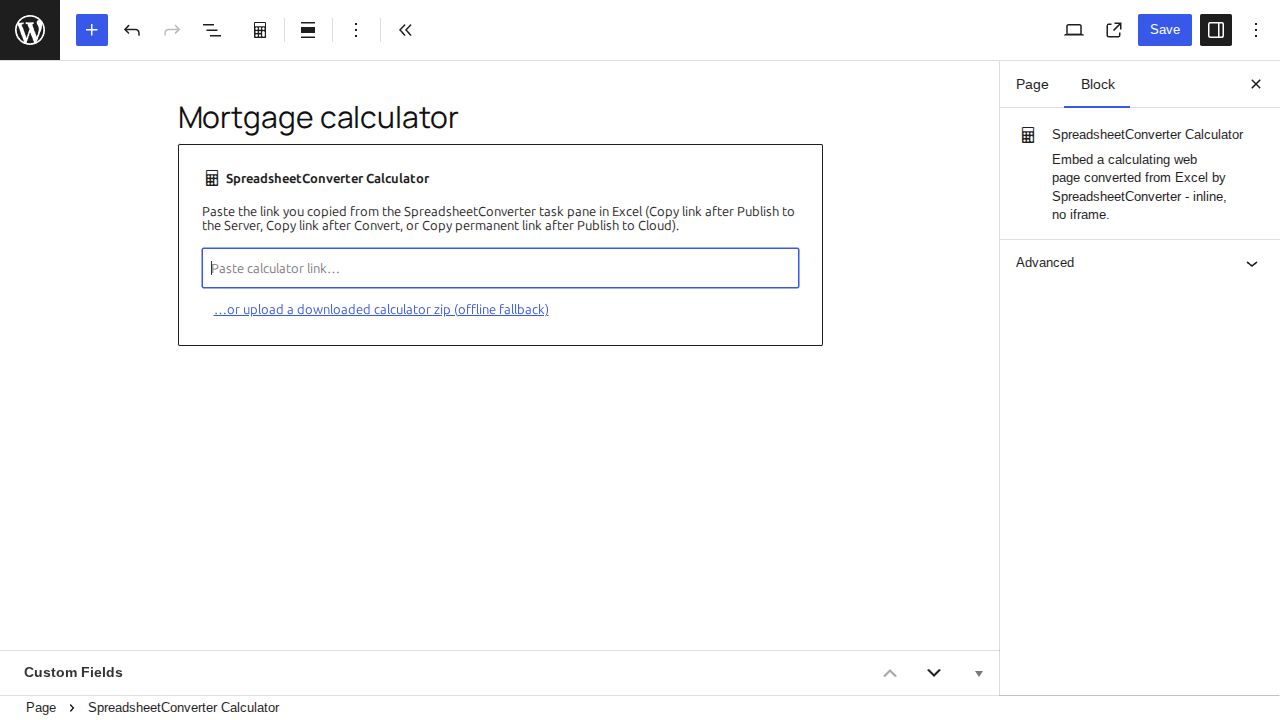
Use one calculator per page. If WordPress cannot retrieve a conversion, the block also supports uploading the complete zip from an Embeddable HTML conversion.
Full WordPress instructions · Take the v12 tour
Earlier versions: original page and screenshots
This preserved page describes earlier releases. Use the v12 guidance above for the current workflow.
WordPress plugin
Embed any Excel spreadsheet in WordPress with only five clicks.
WordPress plugin to import spreadsheets
Now you can embed any Excel spreadsheet in WordPress with only five clicks, thanks to the new plugin for WordPress that imports converted spreadsheets.
We offer a free WordPress plugin that allows you to import live, calculating spreadsheets from Microsoft Excel to your blog or website in WordPress. To use the plugin, you need a Professional Edition license for SpreadsheetConverter. Upgrade now!
Using the plugin
Installing the plugin
Before you publish your first calculator, you must install the plugin in WordPress with help from the instructions in our Installation Guide.
Insert a live spreadsheet in your blog with just five clicks
Any Excel spreadsheet can be published on the web:
- Open the spreadsheet in Excel and click Convert on the SpreadsheetConverter toolbar to convert the spreadsheet to a web page.
- Click WordPress Share on the SpreadsheetConverter toolbar to create an SSC Calculator file with everything you will need in WordPress.
- Use the WordPress plugin to upload the SSC Calculator file to WordPress.
- A fourth click is required to embed the calculator or form into one or more of your posts or pages in WordPress.
- And click number five is when you click Publish in WordPress and your calculator goes live, online on the web!
Managing the uploaded calculators
If you want to move a calculator within the page, or to another page, there’s much to learn in the Manage Uploaded Spreadsheets section, which also tells you how to completely remove a calculator from WordPress.