SpreadsheetConverter installs straight from Excel's built-in Add-ins store — no downloads, no manifest files. The whole process takes about a minute.
Use Excel on your desktop for the install. Don't start from Excel for the web: the Microsoft permission dialog in step 6 only appears in desktop Excel, so a web install can't be completed. (Once installed, you can use the add-in on the web too — see the note after the steps.)
Install from Excel
Start Excel on your desktop (Windows or Mac) and open any workbook.
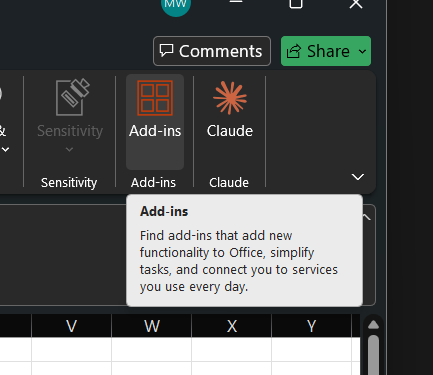
On the Home ribbon, click Add-ins.
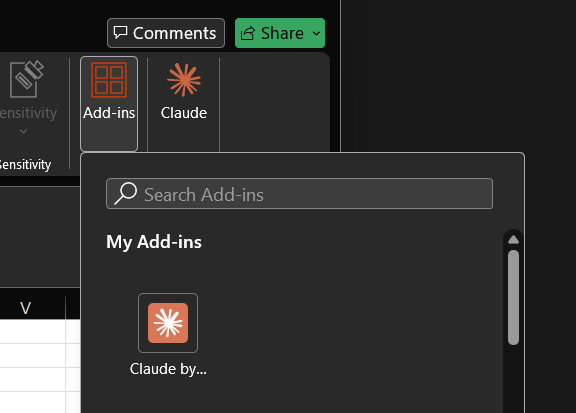
The Add-ins dialog opens, with a search box at the top.
In the search box, type spreadsheetconverter — one word, no spaces. Lower-case is fine.
Find SpreadsheetConverter in the results and click Add.
A Microsoft permission dialog appears — “Let this app access your info?” — showing the publisher Framtidsforum I&M AB and the permission View your basic profile (your email address). Click Accept.
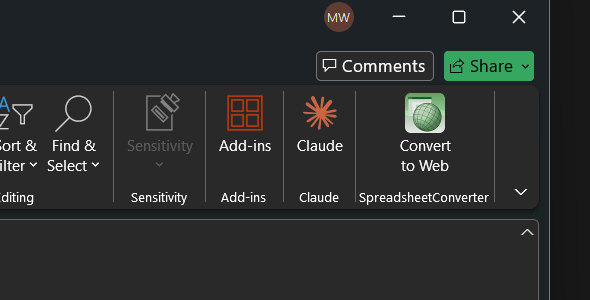
After up to ~30 seconds, a new Convert to Web button appears on the ribbon, in a SpreadsheetConverter group. If you don't see it, look under the … (More) overflow at the right end of the ribbon.
Click Convert to Web to open the SpreadsheetConverter task pane.
Already installed it? Use it on the web too.
Once SpreadsheetConverter is installed and you've accepted the consent for your account in desktop Excel (steps 1–6), you can also use it from Excel for the web at excel.office.com. The add-in is tied to your account, so it's available there too — you only need the desktop install once; the web consent dialog that blocks a first-time install no longer stands in the way afterwards.
Customer feedback
Shared by customers over the years.
The calculations and data behind our Covid-19 risk assessment model are quite complex and without the Spreadsheet Converter we would have not been able to post the tool online in a reasonable time frame.
We use SpreadsheetConverter to create design tools for our products. The Professional edition is able to handle a very large and complex Excel workbook, and saves our web programmer a significant amount of time.
I am an app developer. I found the spreadsheet converter software and it has made app development so much better and easier.
Frederick Feraco, Buddy App Development
Love your products. Just amazing! Can I switch to the mobile converter?
Dean Villegas, San Jose, CA, USA
I started two months ago developing a reservation system for my wine tour business in Excel and converted it for the website with Spreadsheet Converter.
I have been a long-time user of ExcelEverywhere and SpreadsheetConverter and have frequently had issues, made suggestions etc. All have been resolved satisfactorily. However, I have to say version 8 is absolutely brilliant and unlike in the past there is no "but ..."! With a bit of imagination there is virtually nothing that can't be delivered using it. Well done to all and thanks.
This program was a great find for us. Eliminated plenty of money developing custom website as I do this all myself. Plus it has such great features and flexibility, customers love the interface.
Anthony M, Nesconset, NY
I just thought you might like to see what I did with your converter. What a fantastic product! I have been able to add another dimension to my blog with this.
Bingo! That did the trick. I love this product and appreciate your help in resolving my problem. Sorry for my lack of computer knowledge. Satisfied customeer, will recommend it to friends.
Gary, Ville Platte, LA
"We have been using the software and it is an absolute pleasure to use. I have now subscribed to and paid for the Professional HTML version and it is working perfectly.
Thank you. Just to let you know that is a terrific product, I received some compliments from my graphics and website designers; we use the converter for a unique concept.
Tony, Long Island, NY
I thought you might like to see this - I am so happy to have been able to do this kind of thing. Thanks!
I used your software to create a complex earnings calculator for my website. My website management company was so impressed, they asked me to write an article about using your product for their subscriber newsletter.
Sonya
Everything worked so well that we bought the software.
Herman Ka’imiloa Marciel, Marciel.com, Kailua, Hawaii
What a great program! I am certainly not a web expert, but your software impressed my staff, and made me look like I know what I'm doing! I purchased the software and easily installed the form in my webpage in less than an hour. I cannot begin to tell you how happy I am with the results!
Thank you very much...this will save a lot of headaches and make me look good.
Rob C
The only problem I see is everyone inundating me with spreadsheets they'll want created for our site!
Helen E. Logan, USA
That is exactly what I was looking for, you and your program have saved me an amazing amount of time.
Ken Rowland, USA
I've tried this product and it is amazing! It really helps a lot to control our presentations of Excel on the web, especially for customers and business associates.
SpreadsheetConverter v12 is backwards-compatible — open any existing .xlsx you already have.
Click the Convert to Web ribbon button to open the task pane. You re-open the task pane this way for each workbook you open — Excel doesn't keep it open across files.
In the task pane, go to the Convert tab and click Convert.
Conversion takes between 15 seconds and a few minutes, depending on workbook size. Leave the pane open while it runs.
When it finishes, click Preview to view the converted web page.
Enter your licence
If you already own a SpreadsheetConverter licence, open the Account tab in the task pane and enter your licence key there.
Use the email address that the licence key belongs to — the key is validated against that email.
What the consent dialog means
SpreadsheetConverter uses Microsoft Entra (Azure AD) for sign-in. The consent dialog in step 6 grants exactly two things:
Sign you in. The task pane shows your name from your work, school, or personal Microsoft account.
View your basic profile. Used only to identify your account and your trial-or-paid entitlement.
SpreadsheetConverter does not read your mailbox, OneDrive files, or any other data. The consent screen is the standard Microsoft prompt — no personally identifiable data leaves your device beyond what you choose to convert.
Customer feedback
Shared by customers over the years.
I have found your product to be simply marvelous, and the support excellent. Many thanks.
Although we ran into some problems at first due to the complexity of the workbook, Mattias in customer support went above and beyond to help solve the problems.
I just wanted to drop you a line and say that I am delighted with the way you respond so quickly to support questions!
Fred
Bingo! That did the trick. I love this product and appreciate your help in resolving my problem. Sorry for my lack of computer knowledge. Satisfied customeer, will recommend it to friends.
Gary, Ville Platte, LA
Thank you for the prompt replies - excellent support, very refreshing.
Rob V
I got lots of pre-sales help from Anna Winter, and the support I got made the purchasing decision dead easy - you are a great company to deal with. Many thanks again.
I really like SpreadsheetConverter and your VERY quick response so ordered full license today.
Yasuji
Thx! U rock!
Markos
Your tech support has to be one of the top 3 in the world. Thank you again for creating this wonderful program and for the support and quick answers to my problems.
You guys ROCK! I checked the formulas several time and didn't catch that! I'm very impressed with your talent and fast response and service. Thank you!
Greg
Thanks for all the great information; it is obvious you wish to assist others in having successful Web products, and your expertise is much appreciated.
If the Add-ins search doesn't surface SpreadsheetConverter, your Microsoft 365 tenant may restrict add-in installation. Ask your IT administrator, or try a personal Microsoft account.
If anything fails — even partially — please contact support. The beta program depends on hearing about every install hiccup; the form takes 30 seconds and asks for the bare minimum to reproduce the issue.