
Form submission in v12
Your v12 subscription includes SpreadsheetConverter Server hosting, submit and records. Every plan includes unlimited end users, with email or anonymous. Receiving email addresses and submissions remain subject to fair use. Builders and additional team members have separate plan allowances. Team members access data according to their workgroup. End users can see only their own data and do not count towards the team member allowance. Compare subscription plans.
The add-in’s submission settings include Free service, Advance service and Own web server. Configure a destination and a Submit button before converting your form. For the hosted Free or Advance modes, set the receiver email: without it, submitted forms are not emailed to anyone.
Own web server requires a non-empty destination URL. This is a native form submission path; the hosted service uses its own JSON submission workflow. Test your selected destination and successful and failed submission behavior before publishing.
Historical CAPTCHA and secure-email settings are not exposed in the current add-in. Earlier standalone service offers, bundled trial periods, attachment quotas and delivery guarantees below do not establish current v12 plan terms.
The index-quick.htm file
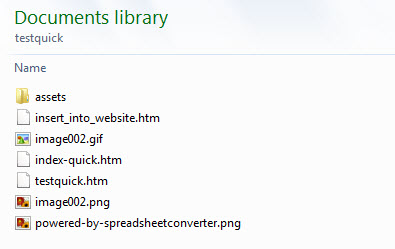
Once you’ve submitted the full web form at least once for each update to the form, the template will already be saved in the forms processing server and you can use the the neater “quick” version for all subsequent submissions of the form.
Workflow
Follow the steps below to use the index-quick.htm version of a form:
- Finish creating or updating the spreadsheet that you use to create the web form.
- Convert the spreadsheet to a web page with SpreadsheetConverter.
- Publish the full version of the updated web form on the web.
- After the first forms submission, replace the web form with the contents of the index-quick.htm file.
Original historical instructions and service information
Original wording below is preserved for earlier versions and services; it is not a statement of current v12 availability or plan terms.
Make your web forms smaller by sending the e-mail template only once.
When you use the Advanced Submit Service, the web form has to include a template for the e-mail to look exactly like the form. If our forms processing server already has saved this e-mail template, you can use the index-quick.htm version of the form which usually is much smaller .
One of the benefits of our fee-based Advanced submit server is that the e-mail you get for each submitted form looks almost exactly like the form. This makes it much easier to read and process the information in the form.
The full version of each web form contains the complete layout for this formatted e-mail. This includes images, widget data and various layout settings from Excel and the theme. Together, all this information can make the web form very large. This increases the time it takes to download the form.
If your users need to submit forms while offline, the size of the full web form can also exceed the technical limitations for the Offline Forms feature .
Our forms processing server always saves the e-mail template, however, so the full web form really only needs to be submitted once to our server every time you change something in the form. During conversion of a web form we generate the web page in several formats, including one called index-quick.htm .
Verify that the e-mails from the Advanced submit server still have the same layout as the web form.