
Embed a calculator in WordPress 
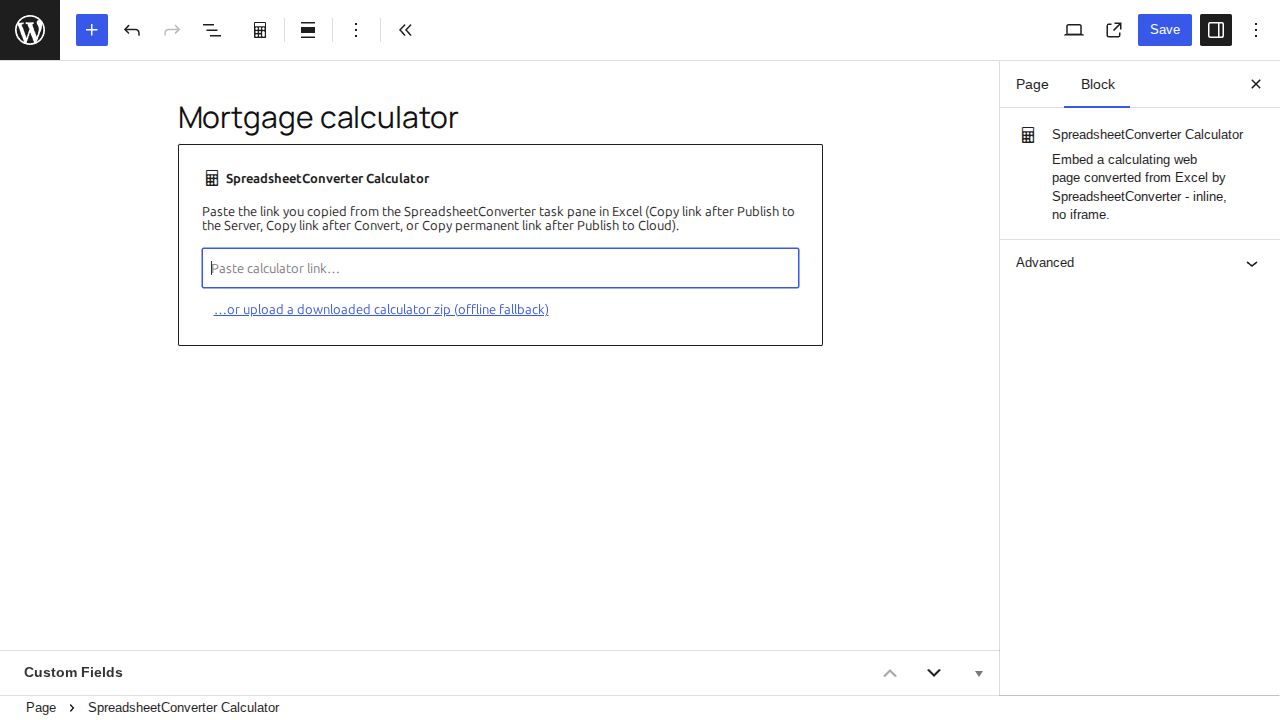
Add the current plugin 
Use the SpreadsheetConverter Calculator plugin, published under the existing WordPress plugin name Import Spreadsheets from Microsoft Excel. The current plugin uses a SpreadsheetConverter Calculator block. The older Upload SSC Calculator administration workflow belongs to the historical archive.
Choose the link from Excel 
Convert the workbook and choose how the calculator will be hosted:
- Server form: Publish to Server, then copy the form’s own link. The Server compiles the workbook; the Embeddable option is not needed for this mode.
- Host on this site: choose HTML flavor with Embeddable enabled, convert, then copy the conversion link from More options → WordPress. Use this short-lived link promptly.
- Link to the cloud: choose HTML flavor with Embeddable enabled and Publish to cloud. Copy the permanent published link, not a temporary Test in cloud link.
Add the block 
- Edit the WordPress page and add the SpreadsheetConverter Calculator block.
- Paste the whole link. The block recognizes its type and offers the appropriate action.
- Choose Embed from the Server, Host on this site or Link to the cloud.
- Check the live preview, publish the WordPress page, then test the public page.
Use one calculator per page. If the block rejects the link, read its explanation: a records-list or properties-page link is not a form link, and a temporary cloud test link is not a permanent publish link.
Upload a downloaded zip 
If WordPress cannot retrieve the conversion, use the block’s downloaded-calculator zip fallback. Use the complete zip from an Embeddable HTML conversion rather than a single HTML file. The plugin expands the bundle into its calculator upload area.
Update the calculator 
A Server-linked page loads the newly published form after you publish to Server again and reload the page. A cloud-linked page uses the permanent cloud destination. For a self-hosted calculator, replace it using the block’s hosting/upload workflow and check the saved page again.
Existing classic-plugin embeds keep their original upload area. Do not delete those files merely because the new plugin uses a different block and upload folder.