
Create your ASP.NET server calculator with Excel
For SpreadsheetConverter v12, see the help, installation guide or product tour.
Earlier versions: show the original page
Create ASP.NET from Excel
Convert Excel spreadsheets to live, calculating ASP.NET web pages, like running Excel on the server.
The SpreadsheetConverter add-on to Microsoft Excel lets you automatically convert Excel spreadsheets to live web pages, with all calculations performed by separate server components running in the Internet Information Server (IIS) on any Windows server.
Let a business expert create a calculator or web form as an Excel spreadsheet including all necessary formulas. Then let SpreadsheetConverter generate the ASPX- or classic ASP-page. When a field on the page is changed, all other fields are automatically recalculated, just like in Excel but running on a server.
Either use the page as it is or open it in Visual Studio for further processing. You can add back-end integration, for example for saving and restoring values to a database. It’s like a server version of Excel, with a web interface.
While the user moves on to edit the next field in the form, the server dynamically instructs the browser to update any fields or charts that were affected by the previous data entry. This enables the browser to provide automatic background recalculation, while still fully exploiting the remote ASP.NET server.
Now you can run Excel on your own server. Just convert your spreadsheets for ASP.NET.

See examples of what SpreadsheetConverter can do for you.
Free offer: Send us a spreadsheet and we’ll send it back as a web page.
It's so easy, you can do it yourself!
In the old days, we used to pass good spreadsheets around. But there were always the old versions floating around that you couldn’t get rid of, with old prices or discounts. As people started making changes to keep up with new business rules, there suddenly were many different versions of the same spreadsheet.
SpreadsheetConverter lets you easily share any Excel spreadsheet with friends, co-workers or customers. It does this by converting your spreadsheet to a live, interactive web page with tabs and charts. If someone edits a value, everything recalculates automatically. You can do this with absolutely no programming!
This way you can share your spreadsheet without releasing control of it. If business rules change, you just update your source spreadsheet and convert it again. You can even hide the formulas with one of our web server flavors.
You can also design smart web forms in Excel, validating user input with Excel’s Data Validation features or with formulas.
You can split forms into sections that the user proceeds through using a Next button or by clicking on panels. You can hide sections until they are needed in a survey or application form.
With forms you get a Submit button that sends the completed form to any e-mail inbox. We can also save survey responses etc in a cloud database – just download any new responses whenever you like.
Just put your Excel skills to work and publish your favorite calculators and smart web forms on the web.

Online spreadsheets make your web professional
A time-saving calculator makes your web site stand out from the competition. It’s so easy to put any existing form or calculator on the web: expense reports, surveys, quote generators, order forms, reservation forms, employment applications, financial calculators, engineering tools – the list is endless.
We’re not only talking simple plus-and-minus spreadsheets here.
- Create mobile-friendly, responsive forms that automatically adapt to different screen widths, portrait/landscape orientation etc.
- To make it easier to understand a large form, split it into two or more separate steps and let users navigate between the sections using tabs, next/previous buttons or sliding panels.
- Use graphical widgets like menus and calendars to make the form easier to use.
- Hide rows or complete sections of a form until you know they are applicable.
- Allow file attachments with submitted web forms.
- You can have mandatory responses.
- Use hidden fields to discretely include supplemental information in the form.
- With Real-time Sync, two or more persons can share a web form and collaborate in real-time.
- Fetch live data from corporate databases when run on ASP.Net or Node.js servers.
- Build forms-based web apps for iPhone and Android devices that can submit smart forms directly – even when the phone is offline.
- Use live, interactive charts that invite users to point-and-click, and the charts automatically update when values are changed.
The free form-to-Inbox service requires no installation, no programming skills and no configuration. Once you upload your first web form to your server, submitted forms start arriving at your Inbox. You are up and running within minutes. For a small monthly fee, we can store submitted forms in a cloud database for you until you visit our server to pick them up.
Example: Simple home loan calculator with slider and live chart
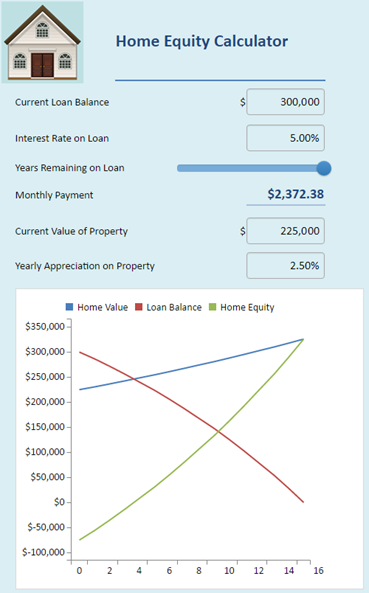
Chart inside an ASP.Net-calculator
Features and benefits
SpreadsheetConverter is the perfect tool for creating calculating web forms and web pages that attract attention.
- It’s easy even for non-programmers: SpreadsheetConverter turns your business users’ Microsoft Excel spreadsheets into scalable ASP.NET or classic ASP applications.
- The formulas are protected: All calculations are done on the server, so your formulas are invisible to the user.
- It’s so easy to change: Just change the spreadsheet and re-run the conversion, and you can open the resulting ASP.NET file directly.
- The response is instantaneous: The browser can communicate each little change separately to the server in the background with asynchronous JavaScript and XML (AJAX).
- Everything is live and interacting with your visitors: The calculator or form updates dynamically when values are changed. Even the charts are live! Use calendars to select dates, stars to set ratings and sliders to vary data in real-time. Create forms with dropdown menus, checkboxes, radio buttons, large text fields, list boxes in a breeze. Design step-by-step wizards for complex forms.
- It looks so good on the web: Normally, it takes a lot of time to make a web page look this well-designed. With Excel you just format the page the way you like. SpreadsheetConverter creates a web page that looks the same: borders, colors, fonts, checkboxes, dropdown lists etc work as they should, and numbers are formatted on the fly with decimals, thousand separators and currency symbols. Play with new layouts inside Excel before you convert them to web format, which saves lots of time (besides being lots of fun). Use graphical themes to give all your calculators a common look.
- Use if with any kind of device: fluid responsive blocks automatically fit any screen, both your handheld devices and your desktop screen.
- Show different images depending on cell values or formulas. Show the right picture of a product depending on what options the user has selected, or show the right map depending on if someone’s arriving by air or train.
- Automatic form-to-Inbox delivery: When users submit completed forms, SpreadsheetConverter delivers them directly to your e-mail Inbox. For a small fee, forms can be saved in a database for later retrieval, thanks to a hosted service that requires no local installation or server.
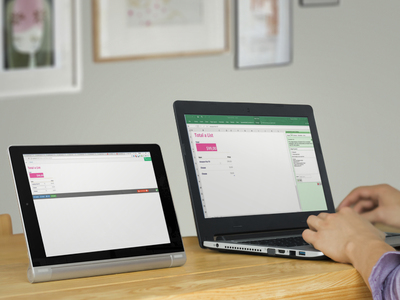

- Two or more team members can share the same spreadsheet: collaborate with your colleagues in real-time to create and analyze calculating forms and web pages.
- The File Attachment widget enables your visitors to include documents, charts, images, videos or any other kinds of files with their form submission.
- It’s so easy to change: Business rules frequently change, e.g. new prices, new discount options, new regulations etc. With hand-crafted web pages it’s hard to keep up with the frequent changes. With SpreadsheetConverter, you just change the spreadsheet, and regenerate the web page.
- You get the source code: The ASP.NET server code is nicely formatted and completely self-contained. There are no library files or other external requirements.
- Integrate it with your own design: Use the web page as it is or open it in Visual Studio for further processing. You can add back-end integration, for example for saving and restoring values to a database. The ASP.NET-page can either be standalone or part of a larger application.
- There are no errors: The calculator doesn’t need any testing, since thousands of users already have tested our calculation engine.
- It’s cost-effective: You need the SpreadsheetConverter program only when you perform the actual conversion from spreadsheet to web page format. You need one license for each PC on which you install the program to perform such conversions.
- Excel isn’t needed: Once the web page is created, Excel is not required. Your web server doesn’t need Excel, and your users don’t need Excel. Even if Excel is all around, not all employees have it, and private persons seldom have it.
- It’s free to distribute: With the Professional Edition, you can make the calculator part of a product that you sell.
- You take no risk: Every purchase comes with a 30-day money-back guarantee and six months of free e-mail support.
Spreadsheets are safe behind ASP.Net
With the ASP.NET version of SpreadsheetConverter, a portion of the web page resides on a Windows server behind the corporate firewall. This makes it much easier to fetch data from a secure database, e.g. the current interest rate, or interact with other server applications. All the sensitive formulas and business rules in the spreadsheet are also inaccessible behind the firewall.
All calculations are performed securely on the server by separate ASP.NET or classic ASP modules, freeing the browser from the workload required to do all the computations. This enables the browser to handle complex user interface logic even for very large web pages.
To maintain rapid response times, SpreadsheetConverter uses state-of-the-art Ajax technology to recalculate only the cells affected by each change. The spreadsheet is then silently updated while the user moves on to another cell.
What’s New?
- With version 11, compatibility with the latest Office 365 Excel and Excel 2021, as well as integration with Google Analytics 4.
- Use only secure content with https links in your web pages
- How to turn an Excel spreadsheet into a sophisticated web app
- Better printing and new calendar widget in version 10.2.
- With version 10, conversion is automatic with Live Preview
Fast, stable and secure
Live, calculating web pages like these are very expensive to develop by hand with all the programming, testing and debugging that takes a lot of time even for a specialist.
By developing your expense report, order form or shipping calculator in Excel, you save a lot of time already at the design stage. Your calculator works and can be tested even before we turn it into a web page for you.
The converter turns the spreadsheet formulas into blocks of standard program code that have been meticulously tested by thousands of users.
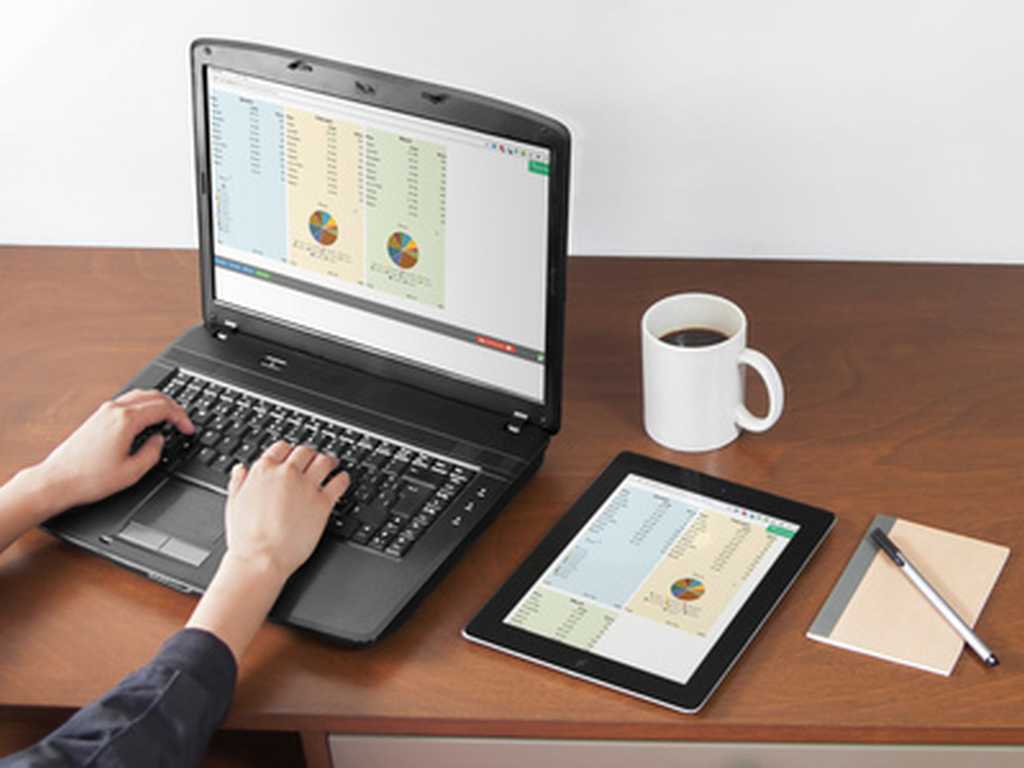
The web pages are responsive and adapt to the screen width. On the narrow screen of the tablet, there is only room for two blocks side-by-side.
Our selection of flavors
- Our basic product converts Excel spreadsheets to HTML with embedded JavaScript that can be used with any web server. All calculations are performed in the browser, without any help from the web server.
- SpreadsheetConverter can also generate HTML5 web apps for iPhone and Android smartphones. These make it easy to collect data with mobile devices, select or configure products or do spreadsheet calculations in a smartphone. Web apps can be delivered through an app store and you can charge for them.
- Special server products generate program code for Node.js, web servers. Since this flavor keep the formulas on the server and perform all calculations there, your business formulas are hidden from the end user. Running the formulas on the server also makes it much easier to add back-end integration, for example for saving and restoring values to a database. Communication with the server is minimal and the web calculator updates itself quietly in the background while the user is busy entering data into the next cell. Your technical people refer to this technology AJAX.
-
The calculations and data behind our Covid-19 risk assessment model are quite complex and without the Spreadsheet Converter we would have not been able to post the tool online in a reasonable time frame.
Vladimir Atanasov, Ph. D., Raymond A. Mason School of Business, Williamsburg, Virginia, USA
-
We are thrilled to have found this solution and would highly recommend it to others considering upgrading their spreadsheets to online tools!
Joe Meyer, MeyerFire, St. Louis, Missouri, USA.
Superior support
We guarantee the best support. During the trial period we will do our best to help you succeed, and six months of e-mail support is included in the price for all products. We promise answers by the next business day, but within the hour is our goal.
SpreadsheetConverter is a mature product that has been for sale since 2002. We constantly add new features to the product. Updates are free within the same major version, so if you buy any version 10 product, all 10.x updates are free.
We are pretty well staffed when it comes to support. Some of our best programmers like to be on call now and then. Most weekdays support will follow the sun from our Asian help desk via Europe to our support center for the Americas in West Virginia, USA. Usually you get to talk directly to the developers, or one of our web designers.
Some errors are really hard to recreate, and then it becomes very difficult for us to see what’s causing your problem. In many cases we may have to ask for a copy of your spreadsheet.
If we release a new major version within six months from your purchase, the upgrade to the new version will not cost you anything. That’s the kind of really nice guys we are.
Low cost, no risk
We recommend that you start with the Standard edition of SpreadsheetConverter HTML to learn the basics. As you become confident in your ability to generate web pages from Excel, you can add more “flavors” – technical publishing environments – to your toolset.
For serious publishing business, the Professional Edition lets you create web pages for clients, supports all the nerdiest Excel functions and provides even more beautiful chart types.
Here is the complete price list:
| Edition | ||
|---|---|---|
| Standard | Professional | |
| License to generate HTML pages | $254 | $494 |
| License to generate pages for iPhone/Android | $334 | $654 |
| License to generate pages for Node.js | $374 | $714 |
| Cost per month | $0 | $0 |
| Cost per page | $0 | $0 |
| Cost per server | $0 | $0 |
| Cost per visitor | $0 | $0 |
| * VAT or the equivalent sales tax in your country will be added to the prices above if applicable. | ||
SpreadsheetConverter is an add-in for Microsoft Excel in Windows. It appears as an extra menu in Excel. Excel and SpreadsheetConverter are only used when you create the spreadsheet and convert it to web format. We charge a small one-time license fee for each computer on which you install the Excel add-in to perform such conversions.
- There are no additional fees per month.
- There are no additional fees per page or conversion.
- There are no additional fees per web server, page view or visitor.
- There are no additional fees for Excel or plug-ins. The web pages we create have everything in them and do not need or use Excel.
In fact, when spreadsheets are available online like this, many people no longer need their own Excel licenses, which can generate additional savings.

There is no risk, you’re safely protected by our 30-day money-back guarantee. If you are not satisfied with your purchase, just send us an e-mail, and we will cancel your purchase and refund the money.
Let us convert a spreadsheet for you, right now!
Let us convert one of your Excel spreadsheets to a live web form or calculating web page. Just e-mail us one of your spreadsheets now and we’ll do it for you. It’s so simple, we’ll even do it for free! Once you see the impressive result, you’ll want to download the program and try for yourself.

Download and try the program for free for 30 days
SpreadsheetConverter is an add-in for Microsoft Excel in Windows. It appears as an extra menu in Excel.
You don’t need a license to test the Excel add-in, just download the trial version and install it on your Windows computer. We recommend that you start with SpreadsheetConverter HTML. If you buy a license for one flavor and later want to upgrade to a different flavor, you only pay the price difference.
SpreadsheetConverter does not collect personal data or show ads. It is easy to remove it completely if you don’t want it.
If you want to preview converted web pages before uploading them to a web server, you will have the option to add an exclusion to the Windows firewall. No other system or browser settings are changed.

Technical requirements
SpreadsheetConverter is an add-in for Microsoft Excel in Windows. If you have a reasonably current version of Excel running in a Windows PC, you’re probably good to go.
For an overview of the various flavors of SpreadsheetConverter and their exact technical requirements, please study the product comparison chart.

Import an Excel spreadsheet in your blog or website
Converting spreadsheets to web format makes it very easy to import them into your blog or website. Here are tutorials on how to do this in various popular environments:
- Import Excel spreadsheets and charts in Blogger
- Import Excel spreadsheets and charts in Drupal
- Import Excel spreadsheets and charts in Google Sites
- Import Excel spreadsheets and charts in Joomla
- Import Excel spreadsheets and charts in Squarespace
- Import Excel spreadsheets and charts in Typepad
- Import Excel spreadsheets and charts in Weebly
- Import Excel spreadsheets and charts in Wix
- Import Excel spreadsheets and charts in WordPress with the plugin
- Import Excel spreadsheets and charts in WordPress without the plugin
- Import Excel spreadsheets and charts in any blog or website
Try this Excel add-in now!



Click on Download to install and test this Excel add-in for Windows.
Click on Upload to let us convert a spreadsheet for you for free.