
SpreadsheetConverter v12
- Easy install from the Microsoft Marketplace, from within Excel. Search for SpreadsheetConverter in Excel’s Add-ins store and click Add — no downloads, no manifest files. See the install page.
- Excel on the web is supported.
- In-place refresh when a newer version is available — no need to download updates.
- Modern page renderer. A new renderer is now the default, with Classic retained as an option. It brings updated controls and wizard presentation, accessibility labels, and integration with SpreadsheetConverter Server.
- Publishing and embedding. The add-in supports authenticated publishing to SpreadsheetConverter Server and choosing which page opens afterwards. Server-hosted forms can be embedded inline on external websites, including WordPress.
- Data-table workflows. Mark ranges as data tables, name them, and choose embedded data or supported server-backed modes. This is a new way to package and connect the tabular data your calculations use.
Install for Excel · What’s new in v12 · Help
Version 12 is offered as a monthly or yearly subscription, billed by builder. SpreadsheetConverter Server hosting, submit and records are included. See current subscription plans.
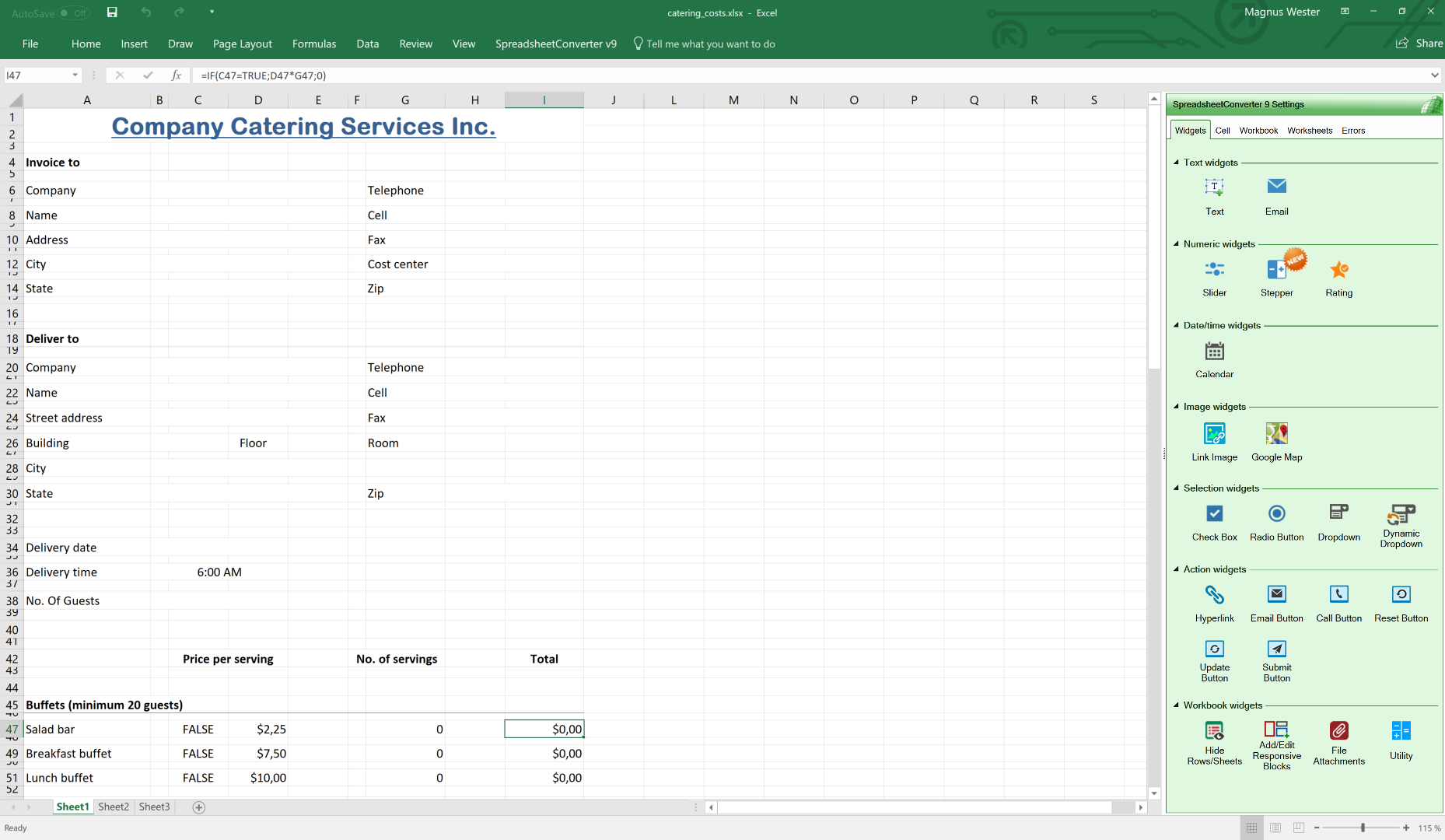
We use a laptop to create an electronic form in Excel. With the tabular structure of Excels rows and columns, it’s very easy to get good-looking results, even with complex forms. Using Excel also gives us access to the functions and formulas we are used to. If we need a subtotal in the form, we just add the formula to the right cell in the spreadsheet.

A spreadsheet in Excel …
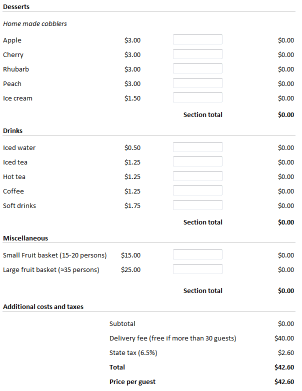
SpreadsheetConverter runs as an add-in in Excel. It converts spreadsheets to modern web pages with advanced functionality that would be very costly to develop using a professional web designer. Create any live calculator or chart and put it up on the web in no time at all. Click on the image to see what we did in detail. When we are happy with our design, we press the Convert button.
Example: a calculating order form for catering
Features and benefits
SpreadsheetConverter is the perfect tool for creating calculating web forms and web pages that attract attention.
- Instantaneous response: All calculations and validations are done immediately when the user enters new data. Everything is done in the browser. No communication with the web server.
- Everything is live and interacting with your visitors: The calculator or form updates dynamically when values are changed. Even the charts are interactive and users can click on a series to hide it. Use calendars to select dates, stars to set ratings and sliders to vary data in real-time. Create forms with dropdown menus, checkboxes, radio buttons, large text fields, list boxes in a breeze. Design step-by-step wizards for complex forms.
- Import Excel spreadsheets into WordPress and use them live on your web pages after conversion to web format.
- It looks so good on the web: Normally, it takes a lot of time to make a web page look this well-designed. With Excel you just format the page the way you like. SpreadsheetConverter creates a web page that looks the same: borders, colors, fonts, checkboxes, dropdown lists etc work as they should, and numbers are formatted on the fly with decimals, thousand separators and currency symbols. If you want numbers to have different colors depending on their values, use the powerful conditional formatting. For a stringent corporate look, apply the same visual theme to all your calculators.
- Use if from any type of device: responsive blocks automatically fit any screen, both your handheld devices and your desktop screen.
- Sends and receives data from other systems using http, barcodes and e-mail.
- Show different images depending on cell values or formulas. Show the right picture of a product depending on what options the user has selected, or show the right map depending on if someone’s arriving by air or train.
- The File Attachment widget enables your visitors to include documents, charts, images, videos or any other kinds of files with their form submission.
- It’s so easy to change: Business rules frequently change, e.g. new prices, new discount options, new regulations etc. With hand-crafted web pages, it’s hard to keep up with the frequent changes. With SpreadsheetConverter, you just change the spreadsheet and regenerate the web page.
- Scalable: Once the web page is downloaded into the visitor’s web browser, no resources are needed on the web server. So if your current website can handle 1,000 simultaneous visitors, a calculator you create with SpreadsheetConverter can be used by 1,000 simultaneous visitors.
- Excel isn’t needed: Once the web page is created, Excel is not required. Your web server doesn’t need Excel, and your users don’t need Excel. Even if Excel is all around, not all employees have it, and private persons seldom have it.
SpreadsheetConverter is a unique product
SpreadsheetConverter makes business users more productive
- Use your existing skills. If you can do it in Excel, you can now put it on the web.
- Everybody’s using the latest version. No more old prices or discounts in old spreadsheets.
- It’s lightning fast. Your spreadsheet formulas are converted to small, fast scripts that run in the user’s web browser.
And there’s more:
- You don’t need a programmer. You don’t get live, calculating web pages like these for free from your web design company. Here you do all the work yourself, in Excel and with the converter, and you still get higher quality and performance – we’ve done this so many times before.
- It’s very easy to change: Business is changing all the time. New prices, new discount structures, new regulations. With hand-crafted web pages it’s hard to keep up with the frequent changes – and you have to pay the programmer every time. With SpreadsheetConverter, you just change your spreadsheet and update the web page.
- It supports almost all Excel’s built-in functions. You can do some pretty advanced calculations in your web page. All but a few advanced financial and statistical functions are supported.
Fast, stable and secure
Live, calculating web pages like these are very expensive to develop by hand with all the programming, testing and debugging that takes a lot of time even for a specialist.
By developing your expense report, order form or shipping calculator in Excel, you save a lot of time already at the design stage. Your calculator works and can be tested even before we turn it into a web page for you.
The converter turns the spreadsheet formulas into blocks of standard program code that have been meticulously tested by thousands of users.
The web pages are responsive and adapt to the screen width. On the narrow screen of the tablet, there is only room for two blocks side-by-side.
Our selection of flavors
- Our basic product converts Excel spreadsheets to HTML with embedded JavaScript that can be used with any web server. All calculations are performed in the browser, without any help from the web server.
-
The calculations and data behind our Covid-19 risk assessment model are quite complex and without the Spreadsheet Converter we would have not been able to post the tool online in a reasonable time frame.
-
We are thrilled to have found this solution and would highly recommend it to others considering upgrading their spreadsheets to online tools!
Superior support
Our support centers in America, Asia and Europe provide support almost 24 hours a day during weekdays. Technically competent support engineers are here to answer your e-mails. They are all programmers and web developers.
If possible, send us a copy of the spreadsheet you’re working on. We know it may be sensitive but it saves so much time trying to recreate the problem you are having.
Low cost, no risk
Here is the complete price list:
- There are no additional fees per month.
- There are no additional fees per page or conversion.
- There are no additional fees per web server, page view or visitor.
- There are no additional fees for Excel or plug-ins. The web pages we create have everything in them and do not need or use Excel.
In fact, when spreadsheets are available online like this, many people no longer need their own Excel licenses, which can generate additional savings.

Let us convert a spreadsheet for you, right now!

Download and try the program for free for 30 days
SpreadsheetConverter is an add-in for Microsoft Excel in Windows. It appears as an extra menu in Excel.
SpreadsheetConverter does not collect personal data or show ads. It is easy to remove it completely if you don’t want it.
If you want to preview converted web pages before uploading them to a web server, you will have the option to add an exclusion to the Windows firewall. No other system or browser settings are changed.
Technical requirements

Import an Excel spreadsheet in your blog or website
Converting spreadsheets to web format makes it very easy to import them into your blog or website. Here are tutorials on how to do this in various popular environments:
- Import Excel spreadsheets and charts in Blogger
- Import Excel spreadsheets and charts in Drupal
- Import Excel spreadsheets and charts in Google Sites
- Import Excel spreadsheets and charts in Joomla
- Import Excel spreadsheets and charts in Squarespace
- Import Excel spreadsheets and charts in Typepad
- Import Excel spreadsheets and charts in Weebly
- Import Excel spreadsheets and charts in Wix
- Import Excel spreadsheets and charts in WordPress with the plugin
- Import Excel spreadsheets and charts in WordPress without the plugin
- Import Excel spreadsheets and charts in any blog or website
Get started with version 12
Install SpreadsheetConverter from Excel, or find downloads and instructions for earlier versions.
Historical product and edition information
The following original website wording describes earlier releases or services. It is retained for reference and does not describe current v12 availability or licensing.
Edition Standard Professional License to generate HTML pages $254 $494 License to generate pages for iPhone/Android $334 $654 License to generate pages for Node.js $374 $714 Cost per month $0 $0 Cost per page $0 $0 Cost per server $0 $0 Cost per visitor $0 $0 * VAT or the equivalent sales tax in your country will be added to the prices above if applicable .
Publish your booking and order forms on the web and have completed web forms sent directly to your inbox.
Use your skills in Excel to design powerful electronic forms with calculated fields for price, volume, weight – anything! Convert your spreadsheet to a calculating web page with a Submit button that can send completed forms to any e-mail inbox.
With the built-in Publish to Cloud service , your web page is automatically hosted on the distributed Amazon S3 infrastructure with superior performance, extreme reliability and massive scalability.
True, real-time, online collaboration: multiple users can update the same calculating web page or web form at the same time, seeing each other’s changes.
Automatic form-to-Inbox delivery: When users submit completed forms, SpreadsheetConverter delivers them directly to your e-mail Inbox. For a small fee, forms can be saved in a database for later retrieval, thanks to a hosted service that requires no local installation or server.
No debugging: No HTML or JavaScript knowledge is needed. SpreadsheetConverter generates bug-free HTML and JavaScript directly from the Microsoft Excel spreadsheet.
There are no errors: The calculator doesn’t need any testing since thousands of users already have tested our calculation engine.
It’s cost-effective: You need the SpreadsheetConverter program only when you perform the actual conversion from spreadsheet to web page format. You need one license for each PC on which you install the program to perform such conversions.
It’s free to distribute: With the Professional Edition, you can make the calculator part of a product that you sell.
You take no risk: Every purchase comes with a 30-day money-back guarantee and six months of free e-mail support.
Only SpreadsheetConverter HTML works on all web servers since we do the calculations using JavaScript. JavaScript is always supported.
Only SpreadsheetConverter has royalty-free distribution. No extra per-server fees.
You can hide your formulas with our server flavors.
With version 11, compatibility with the latest Office 365 Excel and Excel 2021, as well as integration with Google Analytics 4.
Better printing and new calendar widget in version 10.2.
With version 10, conversion is automatic with Live Preview
SpreadsheetConverter can also generate HTML5 web apps for iPhone and Android smartphones. These make it easy to collect data with mobile devices, select or configure products or do spreadsheet calculations in a smartphone. Web apps can be delivered through an app store and you can charge for them.
Special server products generate program code for Node.js , web servers. Since this flavor keep the formulas on the server and perform all calculations there, your business formulas are hidden from the end user . Running the formulas on the server also makes it much easier to add back-end integration, for example for saving and restoring values to a database. Communication with the server is minimal and the web calculator updates itself quietly in the background while the user is busy entering data into the next cell. Your technical people refer to this technology AJAX .
We guarantee premium, high-quality support. You should get answers by the next business day, often within the hour. During your free trial we will assist you as much as we can. Every paid license comes with free e-mail support for six months.
SpreadsheetConverter is a mature product. SpreadsheetConverter has been for sale since 2002. We constantly add new value to the product. Updates are free within the same major version, so if you buy any version 10 product, all 10.x updates are free.
We are nice guys. Should we release a new major version within six months from your purchase, we wouldn’t think of charging you for the upgrade to the new version, so your license is upgraded automatically.
We recommend that you start with the Standard edition of SpreadsheetConverter HTML to learn the basics. As you become confident in your ability to generate web pages from Excel, you can add more “flavors” – technical publishing environments – to your toolset.
For serious publishing business, the Professional Edition lets you create web pages for clients, supports all the nerdiest Excel functions and provides even more beautiful chart types.
There is no risk, you’re safely protected by our 30-day money-back guarantee. If you are not satisfied with your purchase, just send us an e-mail, and we will cancel your purchase and refund the money.
Let us convert one of your Excel spreadsheets to a live web form or calculating web page. Just e-mail us one of your spreadsheets now and we’ll do it for you. It’s so simple, we’ll even do it for free! Once you see the impressive result, you’ll want to download the program and try for yourself.
You don’t need a license to test the Excel add-in, just download the trial version and install it on your Windows computer. We recommend that you start with SpreadsheetConverter HTML. If you buy a license for one flavor and later want to upgrade to a different flavor, you only pay the price difference.
SpreadsheetConverter is an add-in for Microsoft Excel in Windows. If you have a reasonably current version of Excel running in a Windows PC, you’re probably good to go.
For an overview of the various flavors of SpreadsheetConverter and their exact technical requirements, please study the product comparison chart.
Click on Download to install and test this Excel add-in for Windows.
SpreadsheetConverter is an add-in for Microsoft Excel in Windows. It appears as an extra menu in Excel. Excel and SpreadsheetConverter are only used when you create the spreadsheet and convert it to web format. We charge a small one-time license fee for each computer on which you install the Excel add-in to perform such conversions.