HTML and iPhone/Android calculate in the browser
Both SpreadsheetConverter HTML and iPhone/Android do all calculations inside the browser. There are several advantages with this:
- You get the best speed, since the network is not involved after the web page has been downloaded from the server.
- Browser-based applications scale very well to handle many simultaneous users, since your web server is only serving the page to the browser, after which everything is done locally.
- This solution provides off-line calculation. With SpreadsheetConverter iPhone/Android, it may be crucial that the calculator works also without a network connection. SpreadsheetConverter even allows you to submit electronic forms while offline.
Node.js calculates on the server
With the Node.js flavor of the product, all calculations are performed on the server. Special code snippets in the web page act as conduits between the web page and the server.
In order to get the best graphical experience, we use a technology called AJAX to update the web page in the background. The user experience is unchanged, since the cells immediately show updated values.
Advantages with server-based calculations:
- Placing the spreadsheet’s formulas on the server effectively hides them from the end user. It is not possible to download the program components from the server.
- For very large spreadsheets, the calculations run faster, especially if only a part of the spreadsheet is visible on the web page.
- Thanks to AJAX technology, SpreadsheetConverter can create a very responsive user interface also for server-based applications. Read more about AJAX in Wikipedia.
- It is much easier to integrate your solution with back-end systems and databases.
- This is the best solution for password-protected web pages, since the pages cannot be used without access to the server.
- Most of the program code is never downloaded to the web browser. The web page becomes smaller and can be downloaded faster.
Illustrations
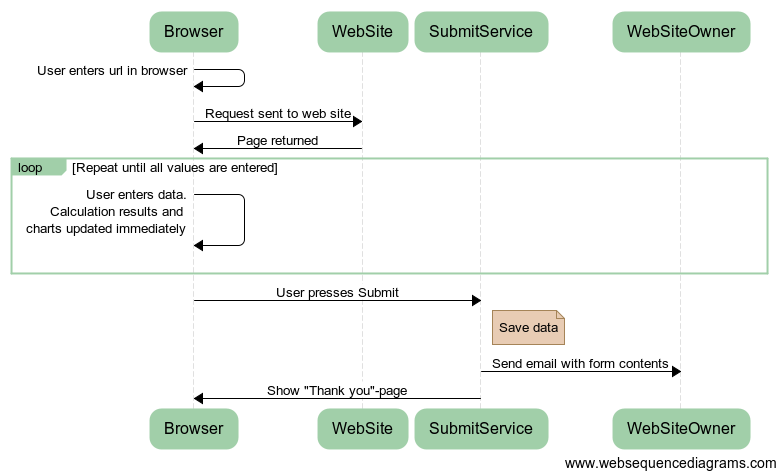
The first diagram shows how SpreadsheetConverter HTML and iPhone/Android pages work.
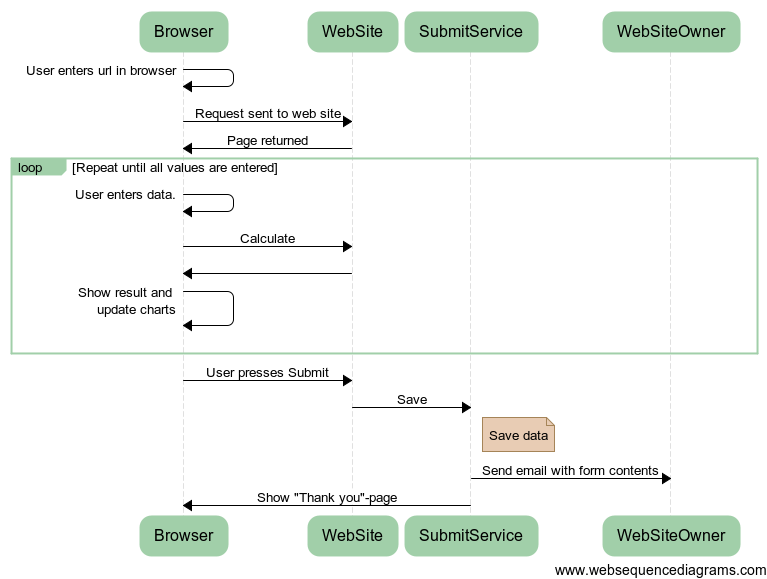
The second diagram shows how SpreadsheetConverter Node.js pages work.
If you are still using SpreadsheetConverter Java/JSP, you should be aware that this deprecated product only recalculates the formulas in the web page upon request. The web browser sends all fields to the server, which performs all the necessary calculations and returns the entire updated web page to the web browser after each recalculation.
Much of the portability of the programming logic comes from the fact that we have taken your Excel file and made a calculating JavaScript spreadsheet out of it.
