The Advanced Submit Service saves incoming web forms in a cloud database hosted by us. You can filter, sort and download saved forms whenever you like. When you use the Advanced Submit Service, all your web forms are sent to our forms processing server, which stores the submitted data in a database for later retrieval. This is extra useful when the volume of submitted forms can be so high that it becomes impractical to handle each form as a separate e-mail. 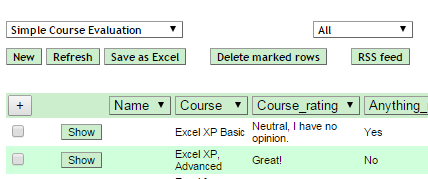 Our server also sends each form response directly to your e-mail Inbox. With the Advanced service, these e-mails look exactly like the form did when the user entered data into it, including graphics and charts. Getting an e-mail for each new form makes it easy for you to know when there is work to do. When the volume of form responses is low, you can even process each form directly from the e-mail, without using the database.
  All submitted forms are stored in a secure database server that is hosted by us, on the Internet. There is absolutely no programming required on your part to use it. All you have to do is sign up for the Advanced service and enter the registered e-mail address when you define each electronic form. The basic subscription includes cloud storage for 100,000 received forms. Whenever you like, you can logon to our server to filter and sort the collected forms before you download them into Excel for further processing. You can also register forms manually, e.g. from paper forms or during telephone calls.
There is no practical limit to the number of different forms you can develop or publish on the web. The subscription fee is $15/month and you can buy a license at the bottom of this page.
Before you can study the forms collected on the server, you need a user name and password that you get from us when you sign up for the service. When you login to your forms database on our server, it looks like this: In this case, a form called Simple Course Evaluation is shown, and the list includes All entries. You can change this to display only the most recently received forms, or forms received between any two dates. If you get some responses by mail or via telephone, you can manually enter form responses directly into the database. Just press New and the original web form opens. Fill it in and press Save and you have added another row to the database. Press Refresh to scan the database for new form submissions. Using the column headers, you can filter and sort the data in the database just like in Excel. 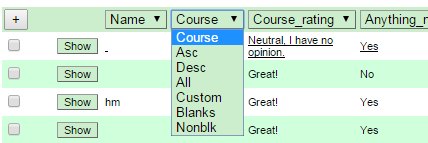 With filtering, you can easily exclude all entries that have a blank value in a particular column, or elect to process only them. With the Custom setting you can also search for unique values like an instructor name, or use wildcards.
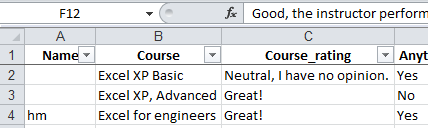
 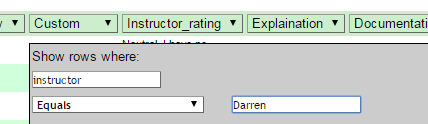 By checking the checkbox next to one or more rows, you can delete unwanted forms submissions or the ones you’ve already downloaded with Delete marked rows. When you have filtered and sorted the list the way you like it, you just press Save as Excel to download all the forms in the list. When you download submitted forms, you get a nice Excel file, with column headers and with AutoFilters enabled. You can now process the electronic forms directly in Excel, copy and paste them to another program or import the file somewhere else.
  Did you notice the RSS Feed button in the first image above? Another convenient feature of the Advanced Submit Service is that you can monitor incoming form submissions both as e-mails and using an RSS reader.
We have created an online demonstration of how you can download forms from the Advanced Submit Service to Excel in your own PC.
The free service simply sends you an e-mail for every completed form, with the form fields and their values in a table. With the Advanced Submit Service, each e-mail contains a screenshot of the whole form, maintaining the original form layout from the web server. This makes it much easier to interpret the contents of the form. If a user opens this form and presses Submit, you will get the following e-mail.
The Advanced Submit Service is licensed separately, per month or with a 15% discount for a yearly license.
Six months of Advanced Submit Service is included for free when you buy a Professional Edition product.
To continue using the Advanced Submit Service after the free trial period, or to start a new subscription, use one of the links below. Save 15% with a yearly payment.
You need one license for each e-mail address you use to receive submitted forms. This e-mail address is also used to login to the server and access all the received forms. There is no limit to the number of different forms you can publish or to the number of responses you can receive for each form.
VAT or the equivalent sales tax in your country will be added to the prices below if applicable. Please contact our pre-sales Help Desk for more information.
The HTML and JavaScript for the web form is created automatically from an Excel spreadsheet
For every completed form, you get an e-mail with all the form fields
Supports mandatory and hidden fields
Responsive, mobile-friendly design
Field contents can be calculated or validated using Excel formulas and functions
Select images or show maps depending on form field contents
Hide rows or entire sections that aren’t applicable
Create multi-step forms with wizard or sliding panel layout
Use themes for formatting and layout
Nothing to install in your server or website
No programming skills required, just enter an e-mail address
No change to configuration or settings
Use all the features of the Free service
Users can send images and documents with forms, max file size 4 MB
Includes 32 GB cloud storage for over 8,000 uploaded files
The e-mail has the same layout as the form
The e-mail includes the form also in PDF and CSV format
Supports images, charts and maps, also in the PDF
Received forms are saved indefinitely in a database
Includes cloud storage for 100,000 saved forms
Sort, filter and download received forms
Password-protected Secure Delivery of forms
Save 15% compared to monthly billing
Use all the features of the Advanced service
Flexible, monthly billing
